
Multi-Tenant Isolation with Attributes
Multi-tenancy is the classic row-level security problem. You have a shared database with rows from many tenants, and each user belongs to one (or a few) tenants. Every query must be scoped so that users only see their own tenant's data — without rewriting every query in your application.
BetweenRows solves this with one row_filter policy plus one user attribute. Adding new tenants is a matter of creating a user and setting their tenant attribute — no new policies, no redeploy.
Setup
This guide uses the canonical e-commerce schema from the demo:
customers— customer records, each tagged with anorg.orders— order records, each tagged with anorg.products— product records, each tagged with anorg.support_tickets— support tickets, each tagged with anorg.
Three tenants exist: acme, globex, stark. Each tenant has 10 customers, 20 products, 34 orders, and ~50 support tickets (numbers come from the canonical scripts/demo_ecommerce seed).
1. Define the tenant attribute
- Go to Attribute Definitions → Create.
- Fill in:
- Key:
tenant - Entity type:
user - Display name:
Tenant - Value type:
string - Allowed values:
["acme", "globex", "stark"](optional enum constraint) - Description:
The customer tenant this user belongs to
- Key:
- Save.
The allowed_values list makes the admin UI show a dropdown when setting the attribute on a user, and the API rejects values outside the enum with a 422.
2. Create three users
- Create
alice, setattributes.tenant = "acme". - Create
bob, setattributes.tenant = "globex". - Create
charlie, setattributes.tenant = "stark".
3. Grant data source access
On your demo_ecommerce data source, add all three users under User Access. (In a real deployment, you would use a data_source_access with scope all or assign via a role.)
4. Create one row filter policy
This is the key step. One policy covers all three tenants.
- Policies → Create.
- Fill in:
- Name:
tenant-isolation - Policy type:
row_filter - Targets: one entry that covers every tenant-scoped table:json
[ { "schemas": ["public"], "tables": ["customers", "orders", "products", "support_tickets"] } ] - Definition:
{ "filter_expression": "org = {user.tenant}" }
- Name:
- Save.
- On the data source page, assign
tenant-isolationwith scopeall.
That's the entire policy layer. No per-tenant policy, no per-user policy.
5. Verify
Connect as Alice:
psql 'postgresql://alice:Demo1234!@127.0.0.1:5434/demo_ecommerce' -c "SELECT org, COUNT(*) FROM orders GROUP BY org;"Expected:
 org  | count(*)
------+----------
 acme |       34
Only acme rows. As Bob:
psql 'postgresql://bob:Demo1234!@127.0.0.1:5434/demo_ecommerce' -c "SELECT org, COUNT(*) FROM orders GROUP BY org;" org | count(*)
--------+----------
globex | 34As Charlie:
  org  | count(*)
-------+----------
 stark |       34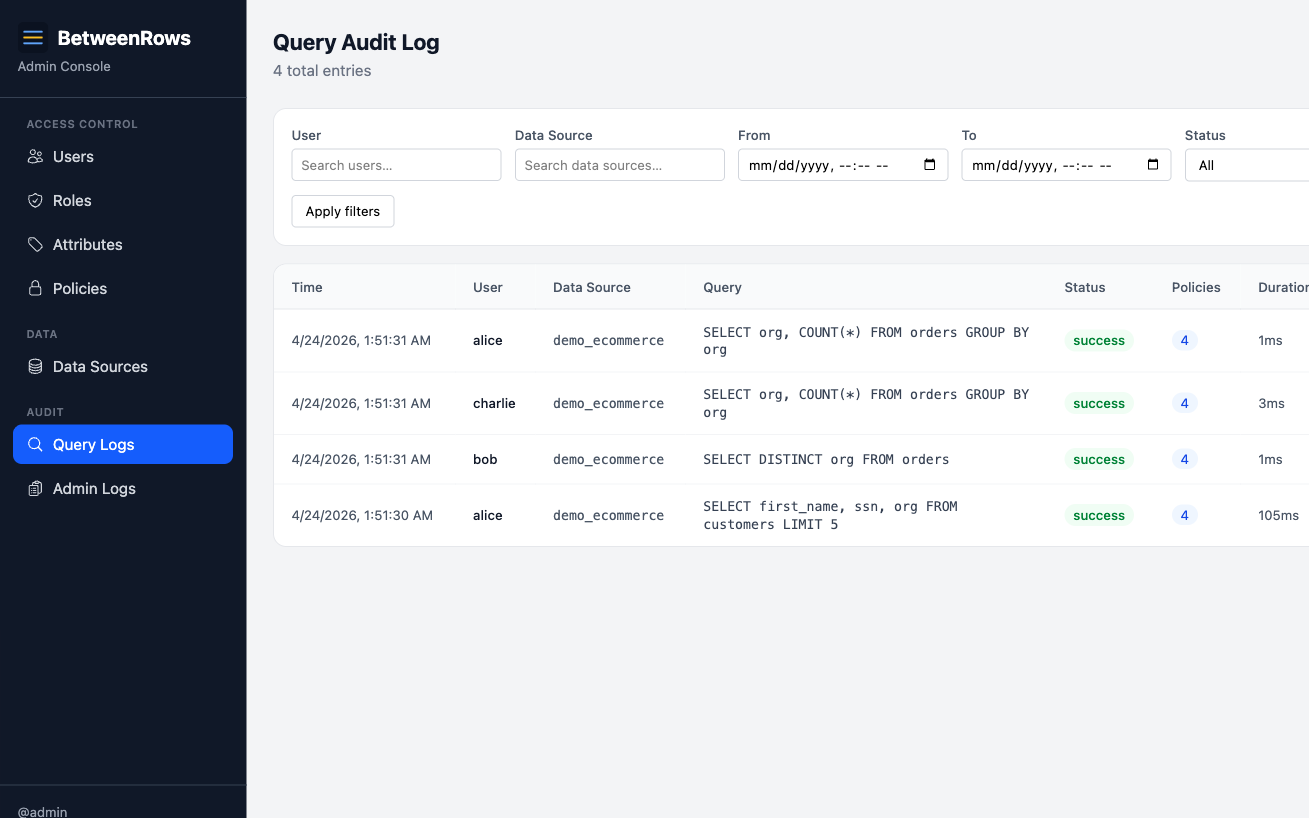
6. Verify that bypass attempts fail
Connect as Alice and try every clever thing a curious SQL author might try:
-- 1. Alias bypass
SELECT * FROM orders AS o;

-- 2. CTE bypass
WITH t AS (SELECT * FROM orders) SELECT * FROM t;

-- 3. Subquery bypass
SELECT * FROM (SELECT * FROM orders) sub;

-- 4. JOIN bypass
SELECT o.id, c.first_name
  FROM orders o
  JOIN customers c ON o.customer_id = c.id;

-- 5. OR short-circuit
SELECT * FROM orders WHERE 1=1 OR org != 'acme';
All five return only Alice's acme rows. The row filter is attached to the TableScan node in DataFusion's logical plan, which is resilient to:
- Aliases — the
TableScancarries the real table name regardless of alias. - CTEs — DataFusion inlines CTEs during planning; the
TableScanpersists. - Subqueries — same inlining behavior; the
TableScanpersists. - JOINs — row filters are applied to each
TableScanindependently. The filter onorderssits below the JOIN; the filter oncustomerssits below it too. Both apply. - OR expressions — the injected filter is a separate
Filternode AND'd with the user's WHERE clause.WHERE (user_where) AND (policy_filter).
7. Add a fourth tenant — no new policies needed
Now the payoff. You sign a new customer, initech. Add them:
- Go to Attribute Definitions → tenant. Add
initechtoallowed_values. - Create user
david, setattributes.tenant = "initech". - Grant David access to
demo_ecommerce.
David can now connect and query. He sees only initech rows. No new policy was created. The single tenant-isolation policy covers him automatically because {user.tenant} expands to his attribute value at query time.
Scaling to 50 tenants? Same policy. 500? Same policy. The only thing that grows is the users table and their tenant attribute values.
When the scope column isn't on every table
The pattern above assumes every tenant-scoped table has an org column. Real schemas usually don't. Normalize enough and org lives on a handful of top-level tables while children reach it through foreign keys: support_tickets.customer_id → customers.org, order_items.order_id → orders.org. Two tables in the same policy might even spell the scope column differently (customers.tenant_id vs accounts.org_id for the same concept).
The single tenant-isolation policy still covers every case — you just register anchors that tell the proxy how to reach org from each child table.
Reaching org through a foreign key
Suppose org lives on customers but the filter also targets support_tickets, which only has customer_id. On Data Sources → demo_ecommerce → edit → Relationships:
- Click Show FK suggestions.
- Find
support_tickets.customer_id → customers.idin the list and click Add.
Then, on the same page, go to Column anchors and click Add anchor:
- Child table:
support_tickets - Resolved column:
org - Resolve via: Relationship (FK walk) → pick the
customer_id → customers.idrelationship.
Alice's SELECT * FROM support_tickets now becomes SELECT * FROM support_tickets WHERE org = 'acme' — the proxy injects an INNER JOIN customers under the filter, projects back to the support_tickets scan schema, and the user never sees the join.
Scope column spelled differently on one table
Suppose accounts carries the tenant concept but calls it org_id instead of org. Same policy, no fragmentation:
- Go to Data Sources →
demo_ecommerce→ edit → Column anchors → Add anchor. - Child table:
accounts· Resolved column:org· Resolve via: Same-table alias → enterorg_id.
The filter expression org = {user.tenant} is rewritten to org_id = 'acme' on accounts only. No join, no plan rewrite.
Check coverage before you trust it
Every row_filter policy's edit page has an Anchor coverage section that dry-runs the same resolution the proxy uses at query time. A green banner means every (assigned table × filter column) pair resolves; a red panel lists the broken pairs. Resolution failures fail safe (zero rows), so an unconfigured table stays invisible until you check — run the coverage preview before assigning, especially after adding new tables to the policy.
For the full model (FK walk vs alias, multi-hop behavior, trust assumptions, the five resolution-failure modes), see Row Filters → Filtering by a column on a parent table.
Extending the pattern
Multiple tenants per user
A consultant who works with multiple clients needs to see rows from multiple tenants. Change the attribute type to list:
- Delete the single
tenantattribute definition (or redefine it). - Create a new attribute definition with
key: "organizations",value_type: "list",allowed_values: ["acme", "globex", "stark", "initech"]. - Set
david.organizations = ["acme", "globex"]. - Change the filter expression to
org IN ({user.organizations}).
At query time, {user.organizations} expands to 'acme', 'globex' (multiple typed literals), and the filter becomes org IN ('acme', 'globex'). David sees both tenants' rows. Alice still only sees acme if she has organizations = ["acme"].
Tenant isolation + column masking
Layer two separate policies:
- name: tenant-isolation
  policy_type: row_filter
  targets: [{ schemas: ["public"], tables: ["customers"] }]
  definition: { filter_expression: "org = {user.tenant}" }

- name: mask-customer-ssn
  policy_type: column_mask
  targets: [{ schemas: ["public"], tables: ["customers"], columns: ["ssn"] }]
  definition: { mask_expression: "'***-**-' || RIGHT(ssn, 4)" }
Alice now sees only her tenant's customers, and their SSNs are masked. Row filters and column masks compose cleanly — the filter evaluates first against raw values, then the mask applies to the result set.
Admin bypass
You want an admin user to see all tenants. Use a decision function that skips the policy for users in the admin role:
function evaluate(ctx) {
  return { fire: !ctx.session.user.roles.includes('admin') };
}
Attach this decision function to the tenant-isolation policy. For users in the admin role, fire: false skips the policy entirely → they see all rows. For everyone else, the policy fires normally.
Alternatively, use a CASE WHEN in the filter expression:
CASE WHEN 'admin' = ANY({user.roles}) THEN true ELSE org = {user.tenant} ENDThe decision function is preferred when the same condition gates multiple policies.
What you learned
- One row filter policy with a template variable scales to any number of tenants.
- Aliases, CTEs, subqueries, JOINs, and OR expressions cannot bypass a row filter.
- User attributes are the natural home for per-tenant values; policies stay generic.
- Adding a new tenant is a user-management task, not a policy-management task.
- Row filters and column masks compose safely.
Next steps
- Audit & Debugging — verify policies via the rewritten SQL
- Users & Roles — RBAC model and role inheritance
- User Attributes — defining and assigning tenant attributes
- Template Expressions — all variable types and NULL semantics
- Threat Model — the security vectors this pattern addresses