
Row Filters
A row_filter policy injects a WHERE clause into every query on matched tables. The filter evaluates against raw (unmasked) data and is applied at the logical plan level — it cannot be bypassed by aliases, CTEs, subqueries, JOINs, or UNIONs.
Purpose and when to use
Use row filters whenever different users should see different subsets of rows from the same table — by tenant, department, region, clearance level, or any attribute-driven dimension.
Field reference
| Field | Value | Notes |
|---|---|---|
policy_type | row_filter | |
targets.schemas | Required | Which schemas to match (supports globs) |
targets.tables | Required | Which tables to match (supports globs) |
targets.columns | Not used | — |
definition.filter_expression | Required | SQL expression using column references and {user.KEY} template variables |
Step-by-step tutorial
This tutorial uses the demo schema. The goal: each user sees only their tenant's rows.
1. Prerequisites
Ensure you have:
- A data source with catalog discovered (e.g.,
demo_ecommerce) - A
tenantattribute defined (value type:string) - Users
alice(tenant:acme) andbob(tenant:globex) with data source access
→ Setup: Demo Schema · User Attributes
2. Create the policy
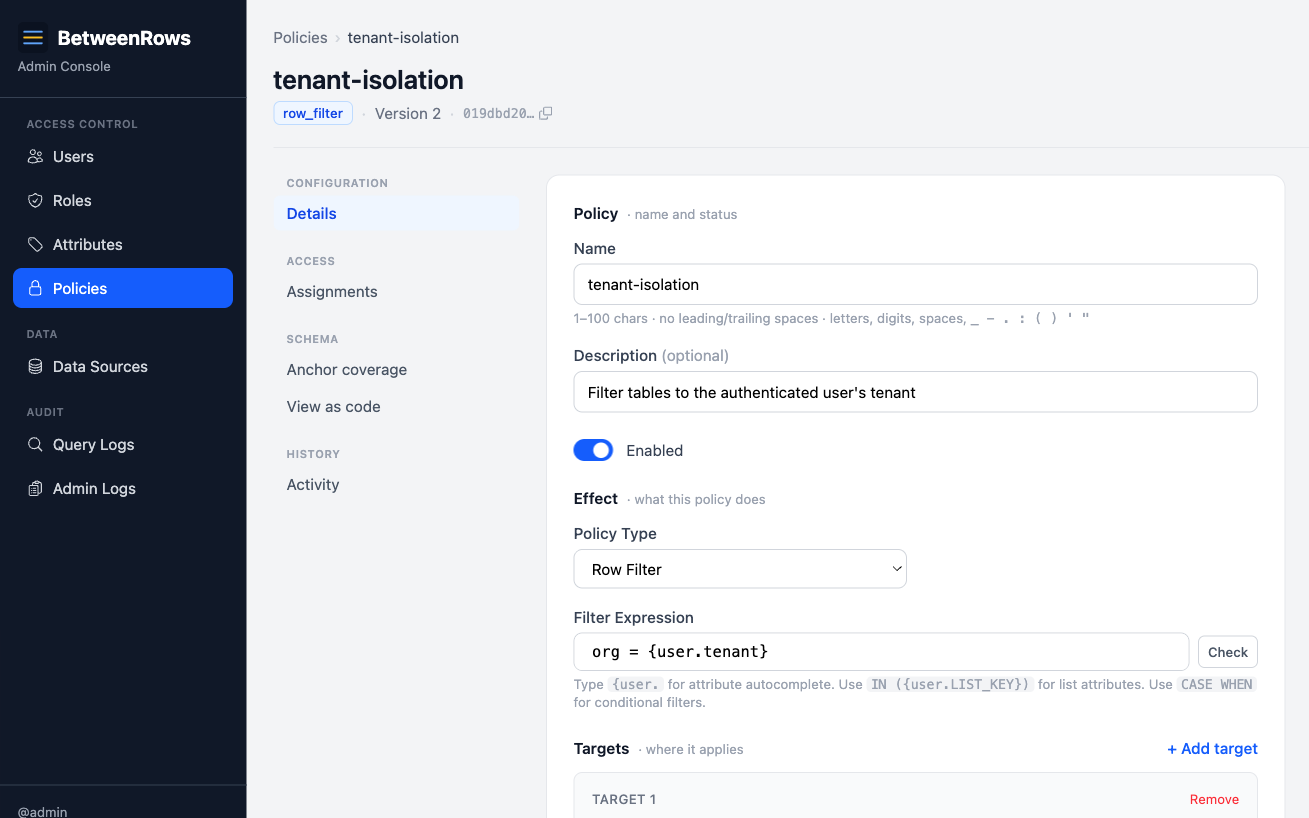
Go to Policies → Create:
- Name:
tenant-isolation - Type:
row_filter - Targets: schemas
*, tables*(applies to all tables with anorgcolumn) - Filter expression:
org = {user.tenant}
3. Assign the policy
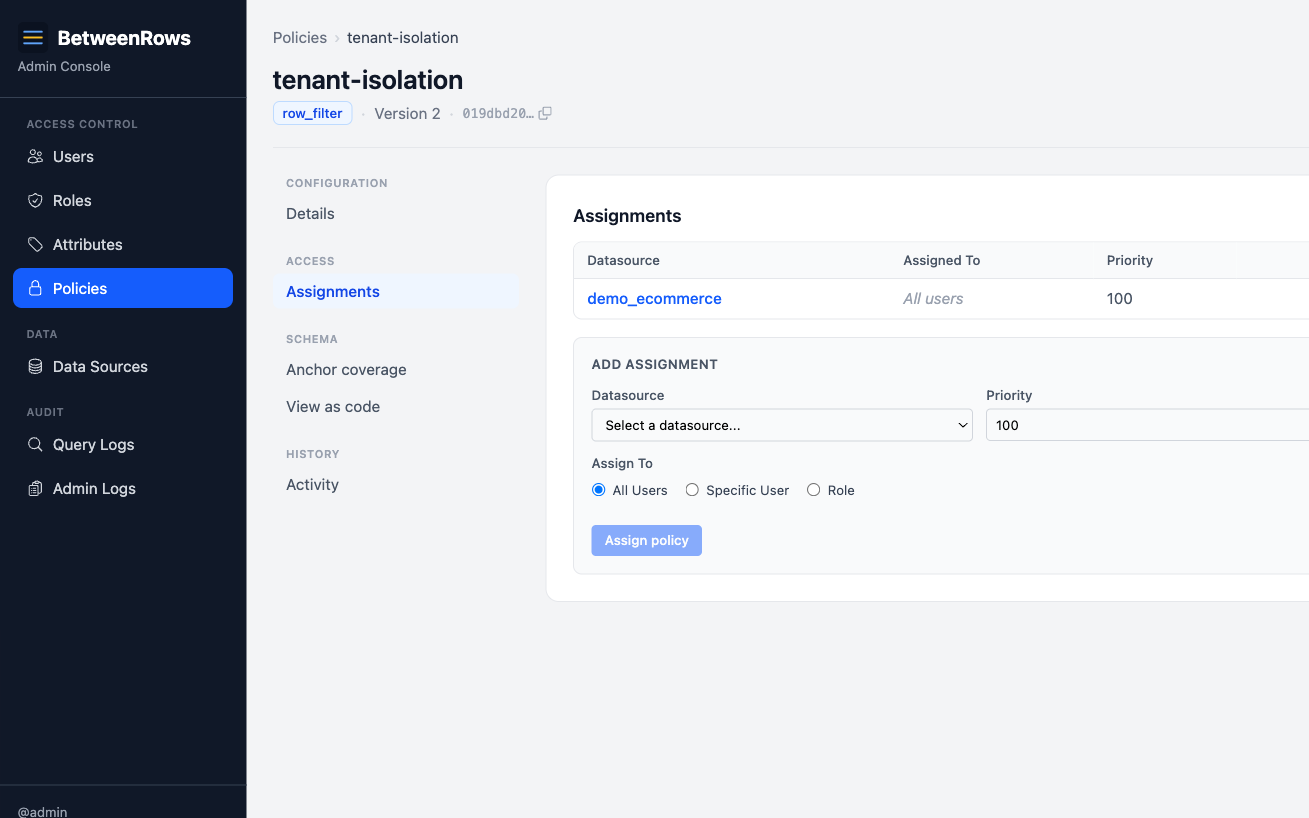
On the data source page, assign tenant-isolation with scope: All users.
4. Verify
Connect as alice and bob:
psql 'postgresql://alice:Demo1234!@127.0.0.1:5434/demo_ecommerce' \
  -c "SELECT DISTINCT org FROM orders"
# → acme

psql 'postgresql://bob:Demo1234!@127.0.0.1:5434/demo_ecommerce' \
  -c "SELECT DISTINCT org FROM orders"
# → globex
5. Check the audit log
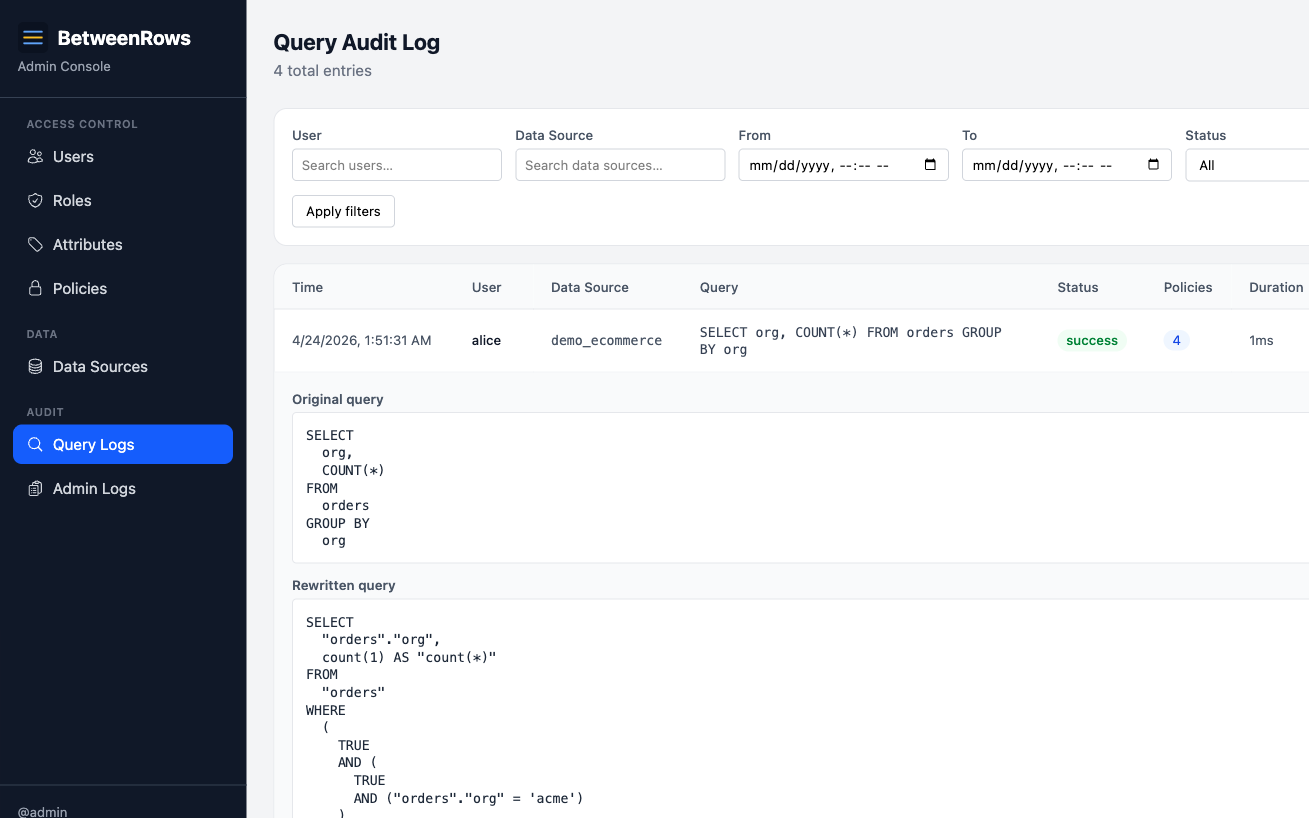
Open Query Audit in the admin UI. Alice's query shows:
- Original:
SELECT DISTINCT org FROM orders - Rewritten:
SELECT DISTINCT org FROM orders WHERE org = 'acme' - Policies applied:
tenant-isolation (v1)
Patterns and recipes
Per-tenant isolation (string)
org = {user.tenant}The most common pattern. One policy covers all tables with an org column.
Clearance-level filtering (integer)
sensitivity_level <= {user.clearance}Users see rows up to their clearance level. A user with clearance: 3 sees levels 1, 2, and 3.
Department allowlist (list)
department IN ({user.departments})A user with departments: ["engineering", "security"] sees rows in either department. An empty list expands to NULL → zero rows.
Date-range restriction
created_at >= '2024-01-01'Static filters work too — no template variable required.
Combined filter (AND)
org = {user.tenant} AND status != 'deleted'A single expression can combine attribute-based and static conditions.
Filtering by a column on a parent table
In a normalized schema, a scope column like org, tenant_id, or workspace_id rarely lives on every tenant-scoped table. A customers table has org, but support_tickets only has customer_id and reaches org through the join. A single broad row_filter like org = {user.tenant} cannot apply to both tables unless the proxy knows how to follow the foreign key. Column anchors tell it how.
A column anchor has two shapes:
- FK walk — the column lives on a parent table reachable via a foreign key. The proxy injects an
INNER JOINagainst the parent and rewrites the plan toProject([target.*], Filter(expr, InnerJoin(target, parent))). The top projection re-emits the target's scan columns, so downstream plan nodes (including column masks) are unaffected.INNER JOINsemantics drop child rows whose FK is NULL, which matches the intent of tenant isolation. - Same-table alias — the column lives on the target table itself but under a different name (e.g.,
customers.tenant_idvsaccounts.org_idfor the same concept). The proxy rewrites the filter expression in place with no join.
Exactly one shape per anchor. Exactly one anchor per (table, column) — enforced by a partial unique index, so resolution is deterministic by construction.
Register a foreign key as a relationship
For the FK-walk shape, first register the join path. Go to Data Sources → edit → Relationships:
- Click Show FK suggestions to see live candidates introspected from the upstream database. Only single-column FKs whose parent column is a primary key or single-column unique appear (the "at-most-one-parent-per-child" precondition) — clicking Add promotes a suggestion into a
table_relationship. - Or click Add manually when the upstream FK is missing or you want a different join path.
For the same-table alias shape, no relationship is needed.
Designate a column anchor
On the same datasource page, go to the Column anchors section and click Add anchor:
- Child table — the table the row filter targets (e.g.,
support_tickets). - Resolved column — the name used inside the filter expression (e.g.,
org). - Resolve via — pick Relationship (FK walk) to choose a registered relationship, or Same-table alias to enter the real column name on the target (e.g.,
org_id).
For a multi-hop walk (e.g., support_tickets → orders → customers where org lives on customers), register one anchor per hop. The resolver walks the chain up to three hops deep.
Check coverage before shipping
The policy edit page shows an Anchor coverage section for every row_filter policy. It dry-runs the same resolution the proxy will use at query time and reports one verdict per (assigned table × column referenced in the filter):
- Resolves on target — the column is literally present on the target.
- Resolves via relationship — the FK walk reaches a parent that carries the column. The anchor chain is shown.
- Resolves via alias — the filter column will be rewritten to the alias on this target.
- No anchor configured — silent-deny. The user sees zero rows on this table until you add an anchor. Links to the datasource page where you can fix it.
- Alias target column missing — the alias points at a column that does not exist on the discovered catalog. Silent-deny.
A green banner means every pair resolves cleanly. A red panel lists the broken pairs. For non-row_filter policies the section is hidden.
Fail-secure resolution
Every resolution failure produces Filter(false) — zero rows, no query error — plus a structured tracing::warn!(reason="column_resolution_unresolved", ...) for ops visibility. The five failure modes are:
- No anchor on the target or an intermediate hop.
- Walk too deep — more than three hops.
- Cycle in the relationship graph.
- Qualified parent reference in the filter expression (
WHERE customers.org = ...). v1 only supports unqualified column references. - Referenced column not on the target and not resolvable via any anchor — also catches alias anchors whose target column does not exist.
Deny-wins on resolution failure means a mis-configured anchor leaks nothing, but it also means an authoring mistake is invisible until you check the coverage panel or run a query. Use the coverage panel before assigning the policy.
Trust model
The anchor designation is the load-bearing trust assumption. A mis-designated anchor — an FK walk pointing at the wrong parent, or an alias pointing at an unrelated local column — can return a different tenant's rows than intended. The proxy cannot infer intent from the schema alone. Mitigations: the FK suggestions dropdown shows every live candidate (so admins see alternatives before choosing), the partial unique index removes nondeterministic path selection, and every relationship and anchor mutation flows through the admin audit log. See Threat Model → vector 73 for the full write-up.
Composition
Multiple row filters → AND
If two row filter policies match the same table, their expressions are AND-combined. A row must satisfy both filters to be visible.
Example: tenant-isolation (org = {user.tenant}) + active-only (status = 'active') → user sees only active rows in their tenant.
Row filters + column masks
Row filters evaluate raw values, even when a column is masked by another policy. If salary is masked to 0 but a row filter checks salary > 50000, the filter sees the real salary — the mask only affects what appears in query results.
This composition is safe by design: the filter runs against truthful data, and the mask runs against the projection.
Row filters in JOINs
Each table in a JOIN is independently filtered by its own row filter policies. Filtering is per-table, not global. A filter on orders does not affect customers in the same JOIN — each table's filter applies to its own TableScan.
Row filters + table deny
If a table_deny hides a table, row filters on that table are irrelevant — the table doesn't exist from the user's perspective.
Limitations and catches
- Bypass-immune by construction. Filters are applied at the
TableScanlevel in the logical plan. No query shape — aliases, CTEs, subqueries, JOINs, UNIONs — can escape them. This is a core security guarantee. - Multiple filters narrow, never expand. AND-combination means adding a filter can only reduce visible rows. There is no OR-combination mode.
- NULL attribute → zero rows. If
{user.tenant}resolves to NULL (user lacks the attribute, no default set), thenorg = NULLis never true. The user sees nothing. This is fail-closed by design. See User Attributes → Missing attribute behavior. - Empty list attribute → zero rows.
department IN ({user.departments})with an empty list becomesdepartment IN (NULL)→ zero rows. - Filter expressions are validated at save time. Unsupported SQL syntax (e.g., correlated subqueries, window functions) returns 422 immediately. See Template Expressions → Supported SQL syntax.
→ Full list: Known Limitations
Troubleshooting
- Filter not applied — check: policy
is_enabled, assigned to the user's data source, target schemas/tables match the queried table, user has data source access. - Zero rows when expecting data — check: user has the required attribute set, attribute value matches the data, no conflicting row filter AND-combining to empty. Inspect the rewritten query in the audit log.
- Filter applied to wrong tables — check target patterns.
schemas: ["*"], tables: ["*"]matches everything. If a matched table does not carry the referenced column (e.g., noorgcolumn) and no column anchor is configured, the policy fails safe: the user sees zero rows and the proxy logs acolumn_resolution_unresolvedwarning. See Filtering by a column on a parent table for how to route the filter through a foreign key or rename.
→ Full diagnostics: Audit & Debugging · Troubleshooting
See also
- Policies overview — which type to use when
- Multi-Tenant Isolation — the flagship row filter use case at scale
- Template Expressions — full expression syntax and NULL semantics
- User Attributes — how to define and assign the attributes that drive filters