
User Attributes (ABAC)
User attributes are custom key-value pairs on users that drive policy expressions via template variables. A row_filter with org = {user.tenant} uses the tenant attribute to decide which rows each user sees. This is BetweenRows' ABAC (attribute-based access control) layer.
Purpose and when to use
Use attributes whenever policy logic depends on something about the user beyond their identity — their tenant, department, region, clearance level, or any other dimension. Attributes are schema-first: you define the attribute (key, type, allowed values) before assigning it to users. This prevents typos and enforces type consistency.
Field reference
Attribute definition fields
| Field | Type | Required | Default | Notes |
|---|---|---|---|---|
key | string | Yes | — | The attribute name used in expressions as {user.<key>}. Cannot be a reserved key (see below). |
entity_type | enum | Yes | — | user (only wired type at launch). |
display_name | string | Yes | — | Human-readable label shown in the admin UI. |
value_type | enum | Yes | — | string, integer, boolean, or list. Determines the SQL literal type. |
default_value | varies | No | null | Value used when a user lacks this attribute. Type must match value_type. |
allowed_values | JSON array | No | — | Optional enum constraint. If set, the admin UI shows a dropdown and the API rejects values not in the list. |
description | string | No | — | Admin-facing documentation. |
Value types and SQL literals
value_type | Example attribute value | Produced SQL literal | Use in expressions |
|---|---|---|---|
string | "acme" | 'acme' (Utf8) | org = {user.tenant} |
integer | 3 | 3 (Int64) | sensitivity_level <= {user.clearance} |
boolean | true | true (Boolean) | CASE WHEN {user.is_vip} THEN ... |
list | ["eng", "sec"] | 'eng', 'sec' (multiple Utf8) | department IN ({user.departments}) |
Reserved attribute keys
These keys are rejected by the API because they would shadow built-in identity fields:
username— built-in:{user.username}id— built-in:{user.id}user_id— alias foridroles— reserved for future use
Step-by-step tutorial
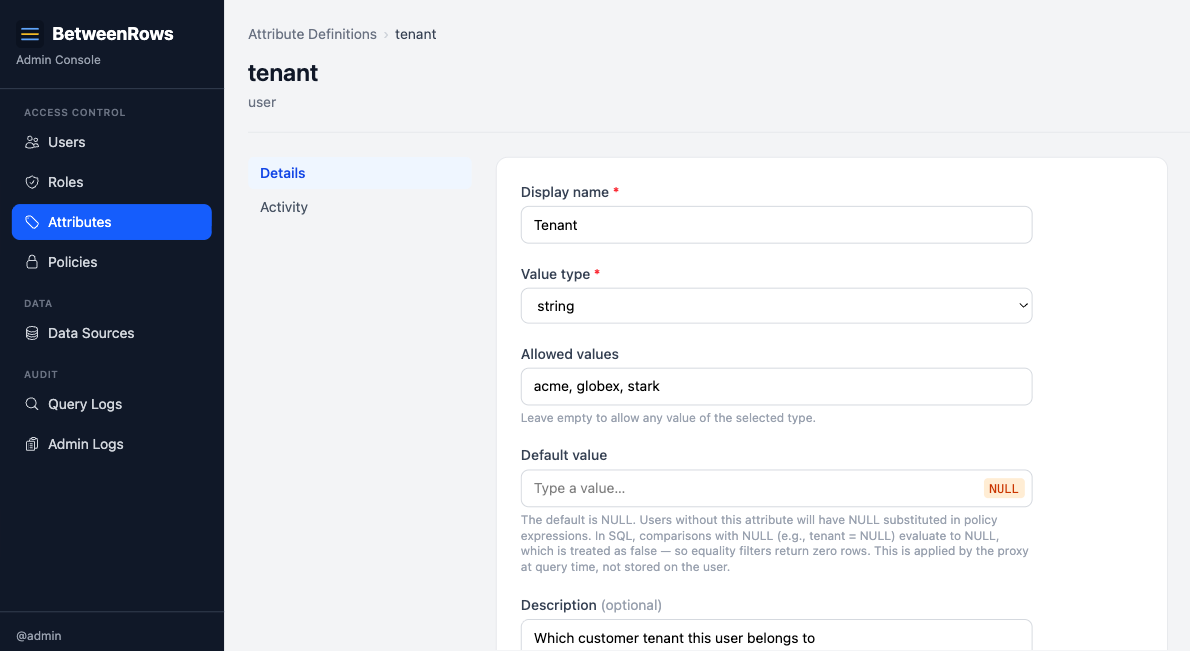
1. Define an attribute
Go to Attribute Definitions → Create in the admin UI:
- Key:
tenant - Value type:
string - Allowed values:
acme,globex,stark - Default value: (leave empty — users without a tenant should match nothing)
- Description: "Which customer tenant this user belongs to"
2. Assign the attribute to a user
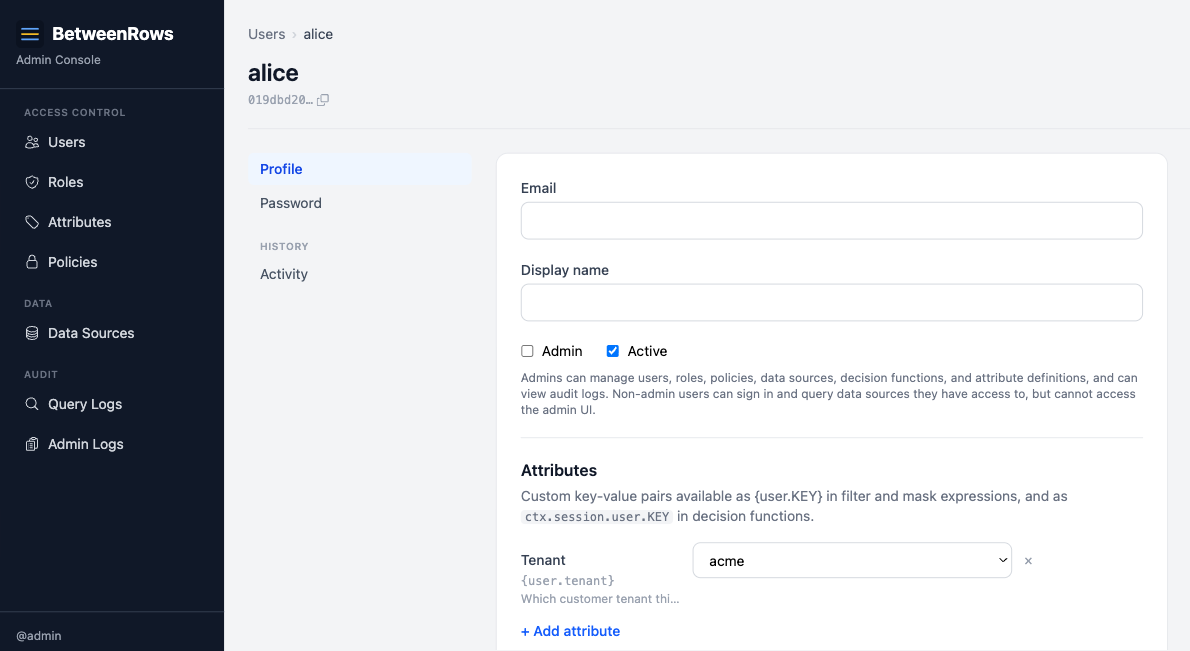
Edit a user (e.g., alice) and set her attributes:
{
  "tenant": "acme"
}
Attribute assignment uses full-replace semantics — the entire attributes object is overwritten on each update. To add a new attribute, include all existing ones in the payload.
3. Use the attribute in a policy expression
Create a row_filter policy with:
org = {user.tenant}When alice queries, this becomes org = 'acme'. When bob (with tenant: "globex") queries, it becomes org = 'globex'.
→ Full expression syntax: Template Expressions
Patterns and recipes
Tenant isolation (string)
The most common pattern. One attribute, one row filter:
-- Attribute: tenant (string)
-- Filter:
org = {user.tenant}
Clearance level (integer)
Numeric comparison for hierarchical access:
-- Attribute: clearance (integer, default: 0)
-- Filter:
sensitivity_level <= {user.clearance}
Department-based column masking (list)
Conditional masking based on department membership:
-- Attribute: departments (list)
-- Mask expression:
CASE WHEN 'hr' IN ({user.departments}) THEN ssn ELSE '***-**-' || RIGHT(ssn, 4) END
VIP flag (boolean)
Boolean attribute in a conditional expression:
-- Attribute: is_vip (boolean, default: false)
-- Filter:
CASE WHEN {user.is_vip} THEN true ELSE org = {user.tenant} END
Composition with other features
- Template variables are the bridge between attributes and policies. Every
{user.KEY}in a filter or mask expression resolves from the user's attributes. See Template Expressions for the full reference. - Decision function context also includes attributes:
ctx.session.user.tenant,ctx.session.user.clearance, etc. — typed JSON values, not strings. - Roles do not carry attributes. Attributes are always per-user. A role-scoped policy with
{user.tenant}resolves from each member's individual tenant value.
Limitations and catches
Missing attribute behavior
When a user lacks an attribute that a policy references:
| User has it? | Definition has default_value? | Result |
|---|---|---|
| Yes | (irrelevant) | User's actual value |
| No | Non-NULL default | Default value as typed literal |
| No | NULL (no default) | SQL NULL — comparisons evaluate to false → zero rows |
WARNING
If you define tenant with no default and a user lacks the attribute, org = {user.tenant} becomes org = NULL, which is never true. The user sees zero rows. This is safe (fail-closed) but can be surprising. Set a default value if you want a fallback behavior.
List attributes: empty list → NULL → zero rows
An empty list attribute expands to NULL in SQL:
department IN ({user.departments})
-- Empty list becomes:
department IN (NULL)
-- Which evaluates to false — zero rows.
This is consistent with SQL three-valued logic. If "no departments" should mean "see everything," use a decision function or a CASE WHEN wrapper instead.
Injection safety
Attribute values are substituted as typed SQL literals after the expression is parsed — they never pass through the SQL parser. A tenant value of '; DROP TABLE users; -- produces the literal '''; DROP TABLE users; --' (one escaped string), not an injection. This is safe by construction.
Attribute definition updates cascade
Changing a definition's default_value or value_type takes effect immediately for all connected users. BetweenRows invalidates per-user policy caches, so the next query uses the new resolution.
Undefined attributes error at query time
If a policy references {user.foo} but no attribute definition named foo exists, the query fails with a parse error. This catches typos and stale policies referencing deleted attribute definitions.
→ Full list: Known Limitations
Troubleshooting
- "Undefined attribute" error — a policy references
{user.KEY}but no attribute definition forKEYexists. Create the definition or fix the typo. - Zero rows when expecting data — check if the user has the attribute set. If not, check the definition's
default_value— a NULL default means zero rows. - API rejects attribute value — check
allowed_valueson the definition. If the enum is set, only listed values are accepted.
→ Full diagnostics: Troubleshooting · Audit & Debugging
See also
- Template Expressions — full reference for
{user.KEY}syntax, SQL subset, and NULL semantics - Users & Roles — how users and roles are managed
- Row Filters — the most common consumer of user attributes