
Audit & Debugging
BetweenRows logs every query and every admin mutation. The audit logs are your primary debugging tool — they show exactly what the proxy did, which policies fired, and what SQL actually ran against the upstream database.
Purpose and when to use
Use the audit logs when:
- A policy isn't behaving as expected (wrong rows, missing columns, unexpected access)
- You need to investigate who changed a policy, role, or user
- You need a compliance trail of all data access and admin actions
- You're debugging a "zero rows returned" or "table not found" issue
The two audit logs
| Log | What it records | API endpoint |
|---|---|---|
| Query audit | Every query through the proxy — original SQL, rewritten SQL, policies applied, status, timing | GET /api/v1/audit/queries |
| Admin audit | Every admin mutation — user/role/policy/datasource changes, who did it, what changed | GET /api/v1/audit/admin |
Both are append-only — there are no UPDATE or DELETE endpoints. Once written, an audit entry cannot be modified.
Audit log fields
Query audit log
A row is written for every query that reaches the proxy, including denied queries and failed queries. Audit entries are written asynchronously after the result reaches the client, so query latency does not include audit I/O.
API: GET /api/v1/audit/queries (filterable by user_id, datasource_id, status, from, to, page, page_size)
| Field | Type | Description |
|---|---|---|
id | UUID | Unique audit entry ID |
user_id | UUID | The authenticated user who ran the query |
username | string | Denormalized username (survives user deletion) |
data_source_id | UUID | The datasource the query targeted |
datasource_name | string | Denormalized datasource name (survives rename) |
original_query | string | The SQL statement as sent by the client |
rewritten_query | string (nullable) | The SQL actually executed against the upstream database, with all row filters and column masks applied. This is the key debugging field — compare it with original_query to see what BetweenRows changed. NULL if the query was denied before rewriting. |
policies_applied | JSON string | Array of {policy_id, version, name} objects — a snapshot of which policies fired for this query, including decision function results. Use this to answer "which policies affected this query?" |
execution_time_ms | integer (nullable) | Wall-clock time for the upstream query execution, in milliseconds. NULL for denied queries. |
client_info | string (nullable) | Application name from pgwire startup parameters (e.g. psql, DBeaver, your app's connection string) |
status | string | One of: success (query completed), error (query failed), denied (query blocked by policy or read-only enforcement) |
error_message | string (nullable) | Error details when status is error or denied. For denied queries, does not reveal which policy caused the denial (404-not-403 principle). |
created_at | datetime | When the audit entry was written |
Key behaviors:
- Denied writes are audited. If a client sends
DELETE FROM orders, the proxy rejects it (read-only enforcement), but a row is still written withstatus = "denied". You can see every attempted write. - The
rewritten_queryshows the real SQL. Row filters appear as injectedWHEREclauses; column masks appear as transformed expressions in theSELECTlist. This is the single best debugging tool for "why did I get these rows?" policies_appliedis a snapshot. It captures the policy name and version at query time, so even if the policy is later edited or deleted, the audit record shows what was in effect.
Admin audit log
A row is written for every mutation to the admin-plane state: users, roles, policies, datasources, attribute definitions, policy assignments, role memberships, and role inheritance. Mutations and their audit entries are written atomically in the same database transaction — if the mutation commits, the audit entry exists; if it rolls back, neither is persisted.
API: GET /api/v1/audit/admin (filterable by resource_type, resource_id, actor_id, from, to, page, page_size)
| Field | Type | Description |
|---|---|---|
id | UUID | Unique audit entry ID |
resource_type | string | The entity type that was changed: user, role, policy, datasource, attribute_definition, policy_assignment, role_member, role_inheritance, data_source_access |
resource_id | UUID | The ID of the entity that was changed |
action | string | What happened: create, update, delete, assign, unassign, add_member, remove_member, add_parent, remove_parent, grant_access, revoke_access |
actor_id | UUID | The admin user who performed the action |
changes | JSON string (nullable) | A JSON object describing what changed. Shape depends on the action — see below. |
created_at | datetime | When the mutation occurred |
Changes JSON shape by action:
| Action | JSON shape | Contents |
|---|---|---|
create | {"after": {...}} | Full snapshot of the new entity (secrets excluded) |
update | {"before": {...}, "after": {...}} | Only the fields that changed |
delete | {"before": {...}} | Full snapshot of the deleted entity |
assign / unassign | {assignment_id, datasource_id, scope, ...} | Flat JSON with relationship identifiers |
add_member / remove_member | {user_id, role_id} | Who was added/removed |
Secrets are never logged
config, password_hash, and decision_fn source code are excluded from audit entries. When these fields change, the audit entry records a boolean flag like "config_changed": true instead of the actual value.
Step-by-step: debug a policy issue
Scenario 1: row filter not applied
Symptom: Alice sees rows from all tenants, not just acme.
- Open Query Audit in the admin UI.
- Find Alice's query. Check the Status field — it should be
success. - Check Policies applied — is
tenant-isolationlisted?- Not listed: the policy is not reaching Alice. Check: policy
is_enabled, assigned to Alice's data source, target schemas/tables match the queried table, Alice has data source access. - Listed: the policy fired but the filter may not be effective.
- Not listed: the policy is not reaching Alice. Check: policy
- Check Rewritten query — does it contain
WHERE org = 'acme'?- No WHERE clause: the template variable may have resolved to NULL. Check Alice's
tenantattribute value. - Wrong value: check which user attribute value Alice has set.
- No WHERE clause: the template variable may have resolved to NULL. Check Alice's
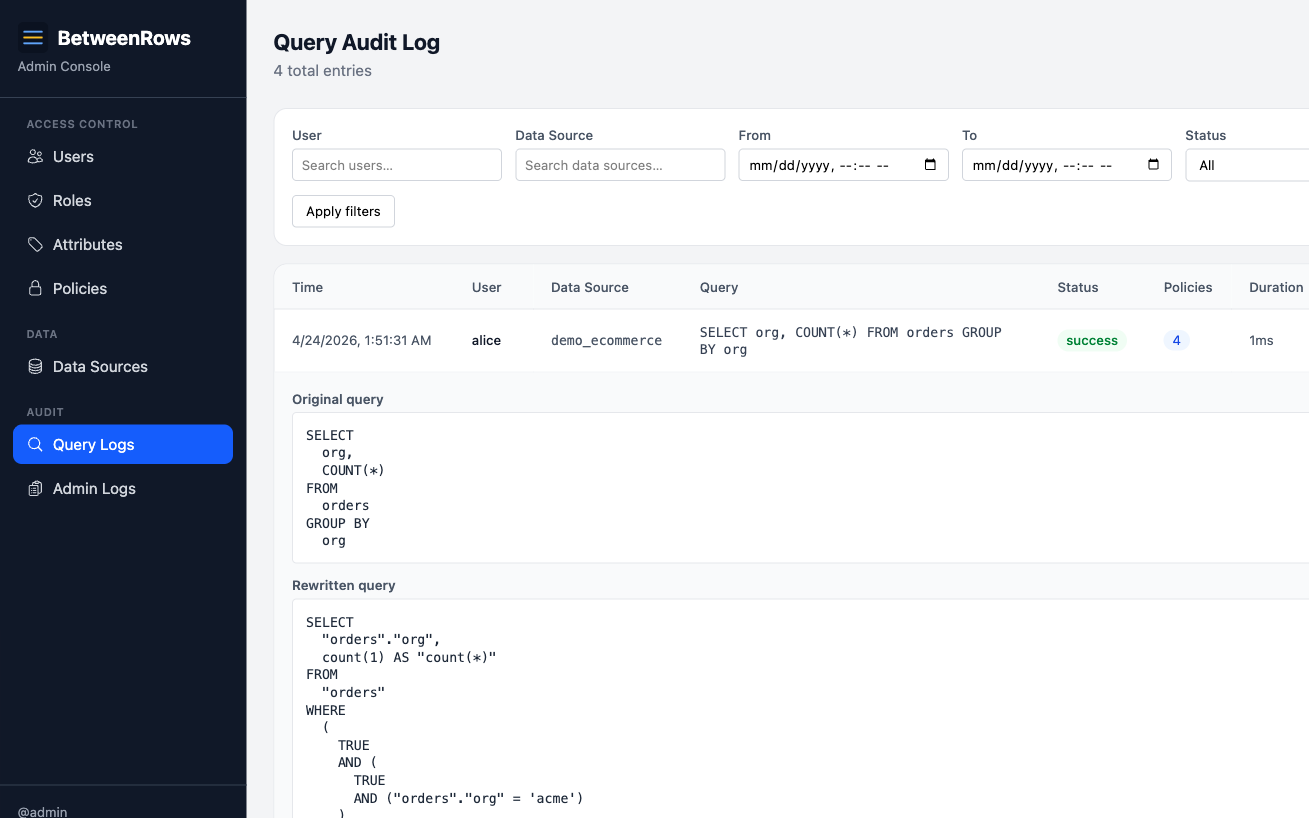
Scenario 2: zero rows returned
Symptom: Alice sees no rows when she should see some.
- In the audit log, find the query and check the Rewritten query.
- Look for
WHERE ... AND falseorFilter: Boolean(false)— this means a policy injected an always-false filter, which happens when:- The user's attribute resolved to NULL (no attribute set, no default value)
- An empty list attribute expanded to
IN (NULL) - In
policy_requiredmode, nocolumn_allowpolicy matched the table
- Check Policies applied — are multiple row filters AND-combining to an impossible condition?
- Check the user's attributes in the admin UI — is the expected attribute set?
Scenario 3: column mask not visible in results
Symptom: You created a column_mask but the column shows raw values.
- In the audit log, check Rewritten query — look for the mask expression in the SELECT list (e.g.,
'***-**-' || RIGHT(ssn, 4) AS ssn).- Mask expression present: the policy is applied but something downstream may be wrong. Check if you're querying the right data source.
- Mask expression absent: the policy isn't firing. Check:
is_enabled, target schema/table/column match exactly (case-sensitive), assigned to the data source, column exists in the catalog.
- Check Policies applied — is the mask policy listed?
- If multiple masks target the same column, check priority numbers — only the lowest-priority mask applies.
Scenario 4: query denied
Symptom: Query returns an error instead of results.
- In the audit log, check Status — should show
deniedorerror. - Check Error message — note that BetweenRows deliberately does not reveal which policy caused the denial (404-not-403 principle). The error says "table not found" or "column does not exist," not "blocked by policy X."
- Common causes:
table_denyhiding the table → "table not found"column_denyremoving all selected columns → SQLSTATE 42501policy_requiredmode with nocolumn_allow→ table invisible- Write statement (INSERT/UPDATE/DELETE) → read-only enforcement
Scenario 5: investigating an admin change
Symptom: "Who changed this policy?" or "When was this user deactivated?"
- Open Admin Audit in the admin UI.
- Filter by
resource_type(e.g.,policy,user,role) and optionally byresource_id. - Each entry shows:
- Actor — which admin made the change
- Action —
create,update,delete,assign,unassign, etc. - Changes — JSON diff of what changed (before/after for updates, full snapshot for create/delete)
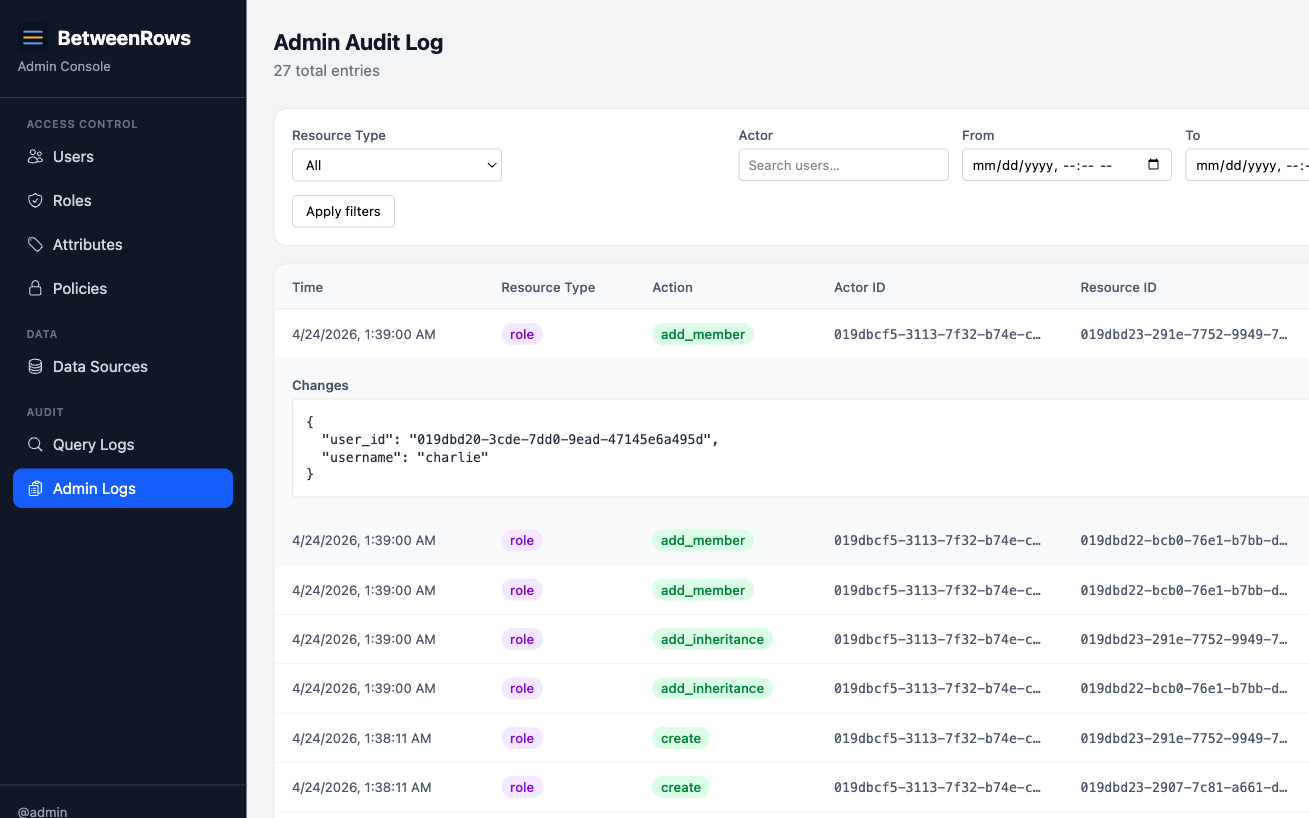
Patterns and recipes
Filter the query audit
The API supports these query parameters:
| Parameter | Type | Purpose |
|---|---|---|
user_id | UUID | Show only queries from this user |
datasource_id | UUID | Show only queries on this data source |
status | string | success, error, or denied |
since | datetime | Entries after this timestamp |
until | datetime | Entries before this timestamp |
limit | integer | Max entries to return |
Example: "Show me all denied queries on production_db in the last hour."
Correlate query and admin audit
When debugging a "policy stopped working," check both logs:
- Admin audit — was the policy disabled, unassigned, or edited recently?
- Query audit — did the policy appear in
policies_appliedbefore the issue started?
The timestamps correlate — find the admin change, then find the first query after it.
Denied writes
BetweenRows is read-only. If a client sends DELETE FROM orders, the proxy rejects it — but the attempt is still audited with status = "denied". Check the query audit for write attempts from users who shouldn't be sending them.
Composition with other features
- Policy changes take effect immediately. After editing a policy, the next query from any connected user reflects the change. The audit log shows exactly when the change took effect.
- Decision function results are included in
policies_applied— you can see whether the function returnedfire: trueorfire: falseand what error (if any) occurred. - Rename safety: the audit log denormalizes
datasource_nameandusernameat write time, so entries survive entity renames. Historical entries show the name at the time of the query, not the current name.
Limitations and catches
- Error messages do not reveal policy details. "Table not found" means a
table_denyor missingcolumn_allowblocked access, but the error doesn't say which policy. This is intentional (prevents probing). Use the audit log to see which policies fired. - Audit entries are written asynchronously. The query result reaches the client before the audit row is committed. In rare crash scenarios, the last few entries may be lost.
- Admin audit records secrets as boolean flags. Password changes log
"field": "password", not the actual hash. Config changes log"config_changed": true, not the connection details. - No retention policy yet. Audit entries accumulate indefinitely. Monitor database size and plan manual cleanup if needed.
Troubleshooting
- Audit log is empty — check: user connected through the proxy (not directly to the upstream), the admin database is writable,
RUST_LOGis atinfoor above. - Missing
rewritten_query— the query was denied before rewriting. Checkstatusfield. - Unexpected
policies_applied— a policy you didn't expect is firing. Check all assignments: user-scoped, role-scoped, and all-scoped. Remember that role inheritance can bring in policies from parent roles.
→ Full diagnostics: Troubleshooting
See also
- Policies overview — understanding what fires and why
- Troubleshooting — connection and policy diagnostic trees