
Data Sources
A data source is BetweenRows' representation of an upstream PostgreSQL database. Before users can query through the proxy, you need to create a data source (connection details) and discover its catalog (which schemas, tables, and columns to expose).
Purpose and when to use
Create a data source whenever you have a PostgreSQL database you want to protect with BetweenRows policies. Each data source is independent — you can connect multiple upstream databases to a single BetweenRows instance, each with its own catalog, policies, and user access grants.
Field reference
| Field | Type | Required | Default | Notes |
|---|---|---|---|---|
name | string | Yes | — | The identifier users put in their connection string as the database name: psql postgresql://alice:secret@proxy:5434/<name>. Max 64 characters, alphanumeric + -_ only, must start with a letter. Renaming is a breaking change — see Rename Safety. |
ds_type | enum | Yes | — | postgres (the only option at launch). |
host | string | Yes | — | Upstream PostgreSQL hostname or IP. |
port | integer | Yes | 5432 | Upstream PostgreSQL port. |
database | string | Yes | — | Database name on the upstream server. |
username | string | Yes | — | PostgreSQL user the proxy connects as. Use a read-only user with the broadest read permissions you want the proxy to expose. |
password | string | Yes | — | Encrypted at rest using BR_ENCRYPTION_KEY (AES-256-GCM). |
sslmode | enum | Yes | require | disable — no SSL; prefer — try SSL, fall back to plaintext; require — SSL required, connection fails without it. Use require for anything outside localhost. |
access_mode | enum | No | policy_required | policy_required (default deny, explicit grant — the default) or open (default allow, explicit deny). Use policy_required for production — see Access modes below. Editable on both create and update via the API; the admin UI currently only exposes this field on the edit form. |
is_active | boolean | Edit only | true | Deactivate a data source without deleting it. Deactivated data sources reject all proxy connections — users see "data source not found." Policies and catalog are preserved. |
Upstream credentials scope
The credentials you enter are what the proxy uses for every query on this data source. If the upstream user can only see the public schema, BetweenRows can only discover and expose public — even admins in the UI cannot browse further.
Step-by-step: create a data source and discover the catalog
These steps use the demo schema as an example. Substitute your own database details.
Log in to the admin UI at
http://localhost:5435.Go to Data Sources → Create. Fill in the connection details:
Field Demo value Name demo_ecommerceHost upstream(or127.0.0.1if running outside Docker)Port 5432Database demo_ecommerceUsername postgresPassword postgresSSL mode disable(local dev only)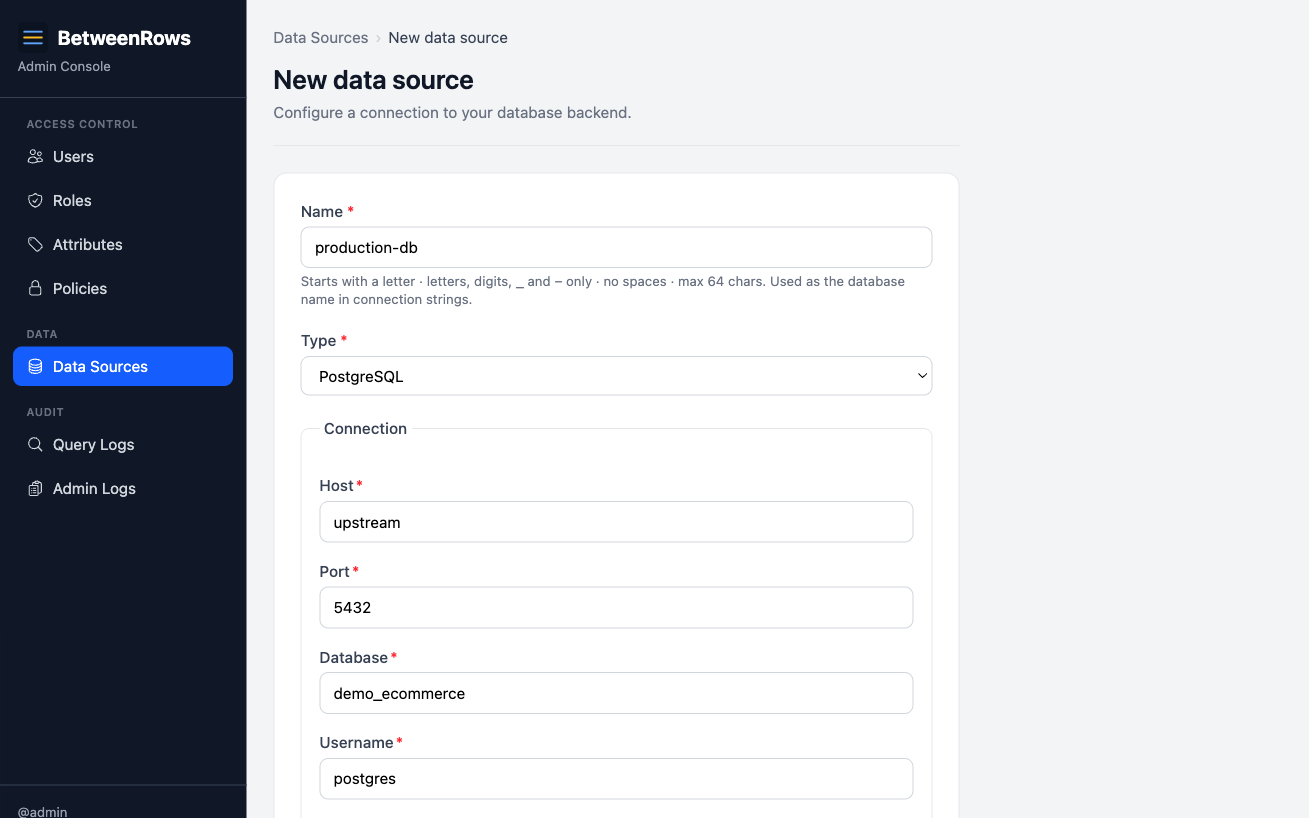
Click Test Connection. A green indicator confirms the proxy can reach the upstream. If it fails, check:
- Host/port reachable from the BetweenRows container (not just your laptop)
- Username/password correct for the upstream database
- SSL mode matches the upstream's
pg_hba.confsettings - Firewall/security group allows the connection
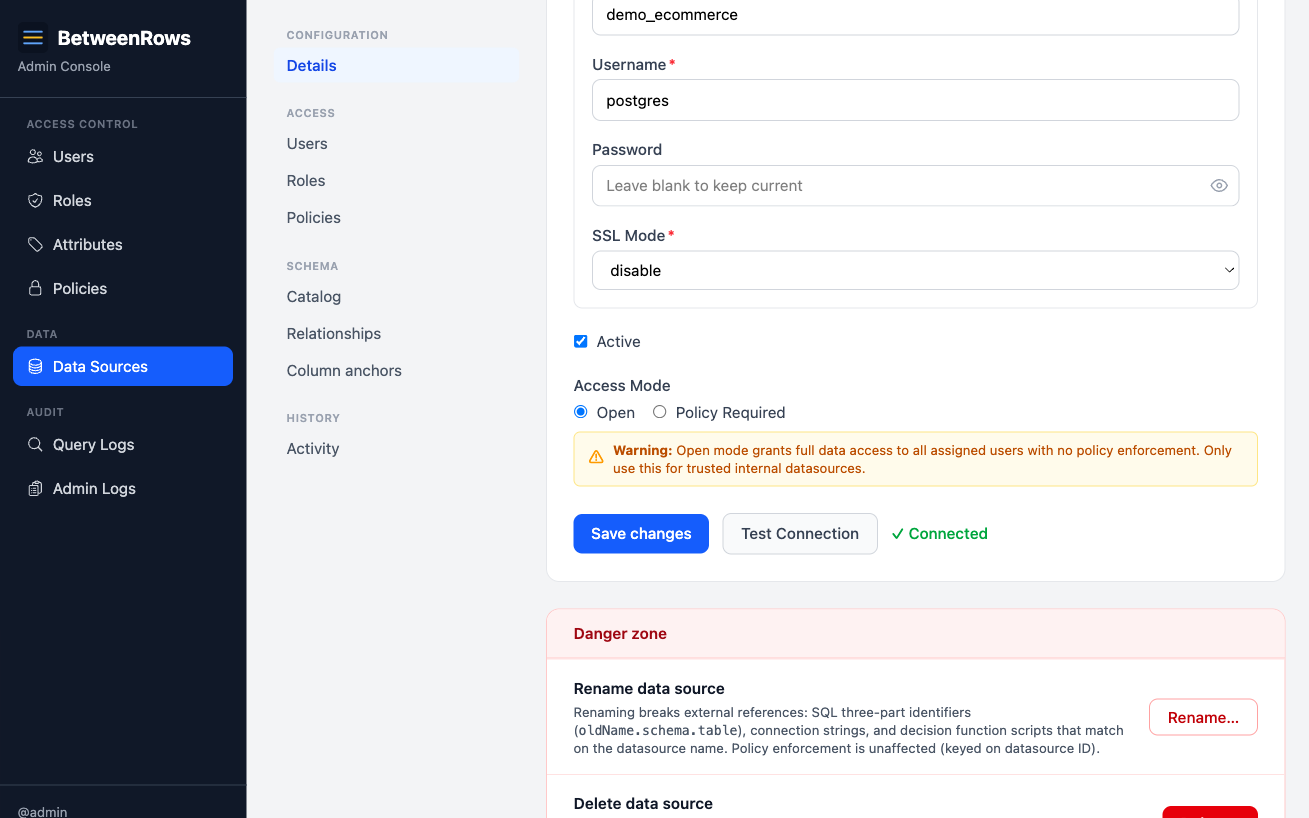
Save the data source.
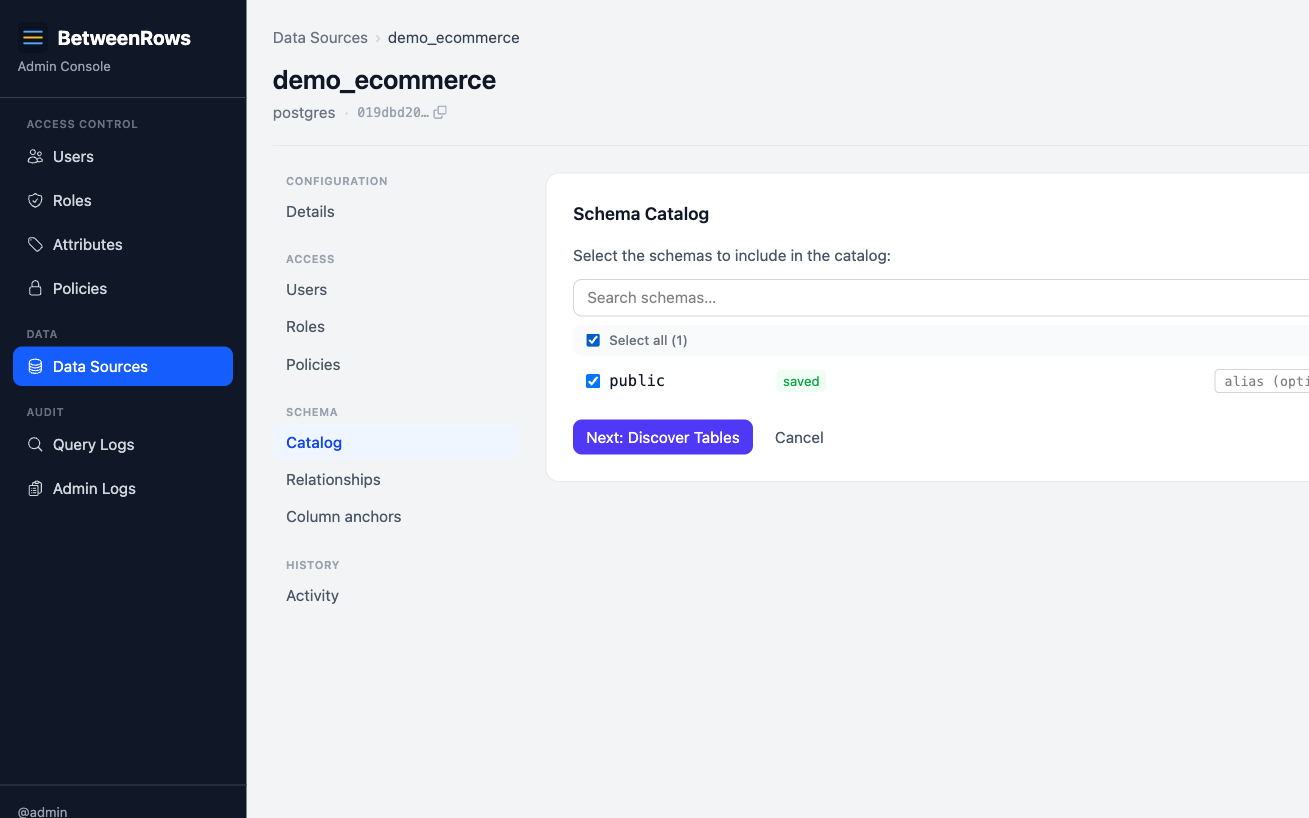
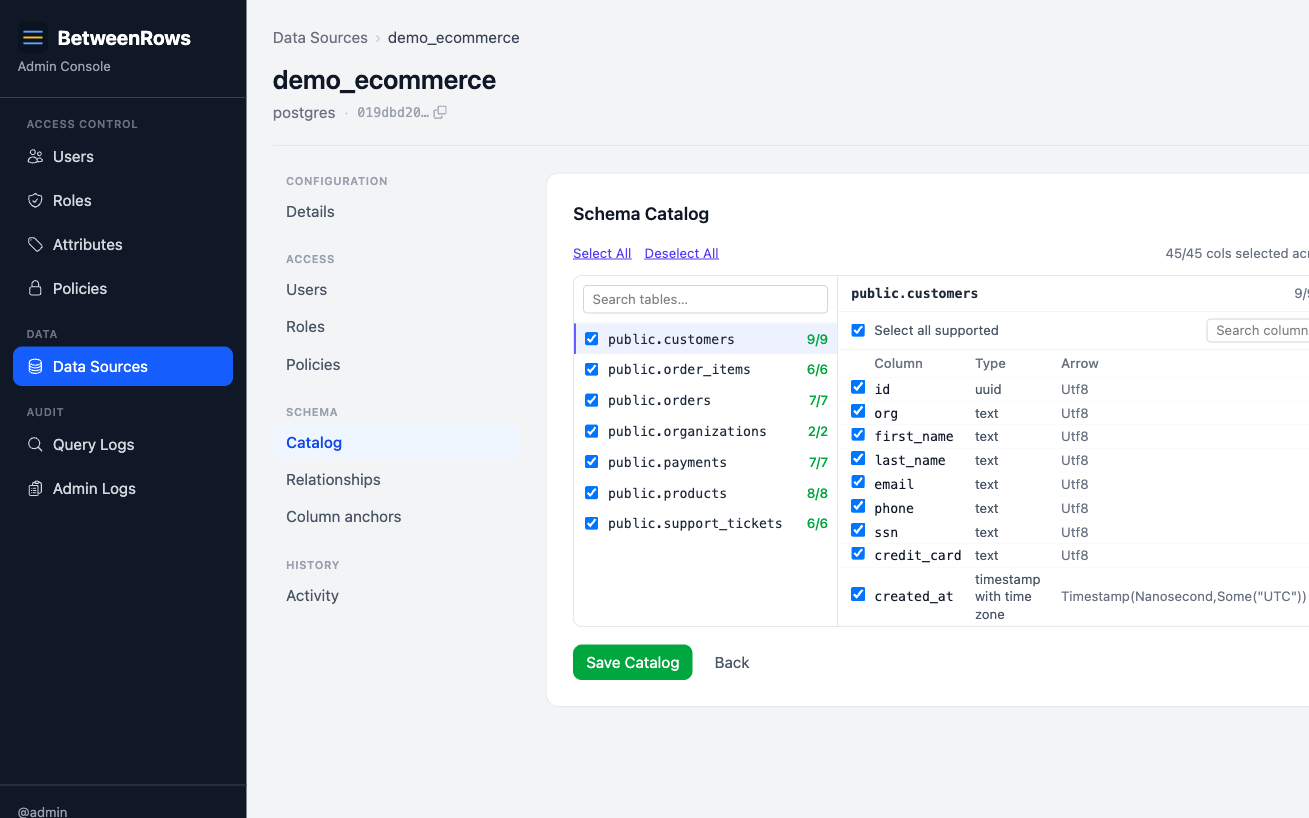
Discover the catalog. On the data source detail page, click Discover Catalog. A wizard walks through four steps:
- Schemas — BetweenRows queries
information_schema.schemata. Select the schemas to expose. Excludepg_catalog,information_schema, and ops schemas. - Tables — for each selected schema, select which tables and views to expose.
- Columns — for each selected table, select which columns to expose. Deselect columns here as a first-pass data-minimization step.
- Save — persist the selections as the baseline catalog.
- Schemas — BetweenRows queries
Grant user access. On the data source page, add users or roles in the User Access section. Admin status does not grant data access — every user starts with zero data plane access.
→ Full demo schema: Demo Schema
Access modes
A data source's access mode determines what happens when no policy matches a table for a given user:
| Mode | Tables with no matching column_allow | Recommendation |
|---|---|---|
policy_required | Hidden from schema metadata, return empty results. A column_allow policy is required to make a table queryable. Default deny, explicit grant. | Production, staging, anything with real data. |
open | Visible to any user with data source access. row_filter, column_mask, and deny policies still apply on top. Default allow, explicit deny. | Local dev, early prototyping, throwaway demos. |
Both modes run the full policy engine — open does not disable policies. Deny policies (column_deny, table_deny) are enforced identically in both modes.
Switching from open to policy_required
If you flip from open to policy_required without first creating column_allow policies, all tables become invisible immediately. Create the allow policies first, then switch the mode.
→ Conceptual explanation: Policy Model → Access modes
Patterns and recipes
Multiple data sources, one proxy
Create separate data sources for each upstream database. Users connect with different database names in their connection string:
psql postgresql://alice:secret@proxy:5434/production_db
psql postgresql://alice:secret@proxy:5434/analytics_db
Policies are assigned per data source — a row filter on production_db does not affect analytics_db.
Read-only upstream user
Give the proxy a dedicated read-only PostgreSQL role:
CREATE ROLE betweenrows_reader LOGIN PASSWORD 'strong-password';
GRANT CONNECT ON DATABASE mydb TO betweenrows_reader;
GRANT USAGE ON SCHEMA public TO betweenrows_reader;
GRANT SELECT ON ALL TABLES IN SCHEMA public TO betweenrows_reader;
ALTER DEFAULT PRIVILEGES IN SCHEMA public GRANT SELECT ON TABLES TO betweenrows_reader;
This limits the blast radius if BetweenRows credentials are compromised — the upstream user can only read, never write.
Deactivating vs. deleting
- Deactivate (
is_active = false): proxy rejects connections to this data source. Policies, catalog, and access grants are preserved. Reactivate anytime. - Delete: permanently removes the data source and cascades to all associated catalog entries, policy assignments, and access grants. This is irreversible.
Use deactivation for maintenance windows; use deletion only when removing a data source permanently.
Composition with other features
- Catalog defines the universe of what exists from the proxy's perspective. Policies narrow that universe per user.
column_allowgrants visibility to specific columns within the catalog (only matters inpolicy_requiredmode).column_deny/table_denyremoves things from the catalog per user, regardless of access mode.column_masktransforms values at query time; the column must be in the catalog.row_filterrestricts rows; the table must be in the catalog.
Think of the catalog as "what can potentially exist" and policies as "what each user actually sees."
Limitations and catches
table_denytargets use the upstream schema name, not any alias. If the upstream schema ispublicand you create atable_denytargeting a different name, it silently fails. Always use the schema name as shown in the catalog discovery.- Catalog re-discovery applies on the next connection. Existing sessions keep seeing the old schema until they reconnect.
- Catalog drift is intentional. When the upstream adds a new table or column, it is not automatically exposed. You must run Sync Catalog and explicitly select the new items. This is deliberate data-minimization — schema changes upstream never widen the attack surface without an admin's action.
- New items default to not-selected during sync — you must opt them in.
- Renaming a data source is a breaking change for connection strings, stored SQL, BI tools, and decision functions that reference the name. Policies continue to work (they reference by ID, not name). See Rename Safety.
→ Full list: Known Limitations
Troubleshooting
- Test Connection fails — check host/port reachability from inside the BetweenRows container, upstream credentials, SSL mode, and firewall rules. See Troubleshooting → Data source issues.
- No tables after discovery — the upstream user may lack
SELECTpermission oninformation_schema.tablesor the selected schema. - Users see empty results — in
policy_requiredmode, check that acolumn_allowpolicy exists and is assigned. Inopenmode, check fortable_denyorrow_filterpolicies that might filter everything. - Connection string rejected — the database name in the connection string must match the data source
nameexactly (case-sensitive).
→ Full diagnostics: Troubleshooting · Audit & Debugging
See also
- Configuration —
BR_ENCRYPTION_KEYand other env vars - Policies overview — which policy types to layer on top of the data source
- Rename Safety — what breaks when you rename